Articles
Articles
Articles
Articles
Articles
Company
eBay
Company
eBay
Role
Product Design Lead
Scope
End to end experience
Scope
End to end experience
Scope
End to end
Duration
March – October, 2016
Duration
Mar – Oct, 2016
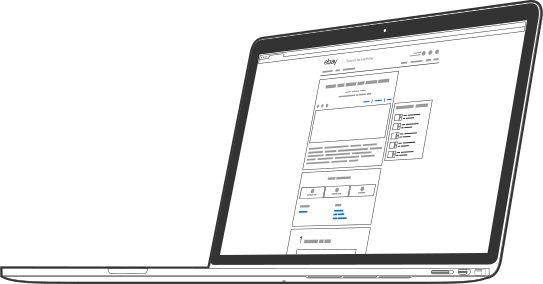
Articles is a publishing platform designed to help buyers make well-informed purchasing decisions without leaving eBay. Articles empowers sellers, buyers, and content publishers to share their expertise and learn from others.
Articles is a publishing platform designed to help buyers make well-informed purchasing decisions without leaving eBay. Articles empowers sellers, buyers, and content publishers to share their expertise and learn from others.
Articles is a publishing platform designed to help buyers make well-informed purchasing decisions without leaving eBay. Articles empowers sellers, buyers, and content publishers to share their expertise and learn from others.
Articles is a publishing platform designed to help buyers make well-informed purchasing decisions without leaving eBay. Articles empowers sellers, buyers, and content publishers to share their expertise and learn from others.
Video: How to Create an eBay Buying Guide. Courtesy of eBay.
Background
Background
Background
Background
Background
eBay was running three different publishing platforms: Guides, Stories, and lesser-known Lists. Originally created for engagement purposes, Guides were providing massive SEO traffic. With the importance of content for social marketing, the guides platform role expanded to influencers. Stories and Lists were created for premium content publishers, thus creating three platforms. Guides, Stories, Lists (and Collections) all had a different feel and appeared disconnected when browsing through the different content types.
eBay was running three different publishing platforms: Guides, Stories, and lesser-known Lists. Originally created for engagement purposes, Guides were providing massive SEO traffic. With the importance of content for social marketing, the guides platform role expanded to influencers. Stories and Lists were created for premium content publishers, thus creating three platforms. Guides, Stories, Lists (and Collections) all had a different feel and appeared disconnected when browsing through the different content types.
eBay was running three different publishing platforms: Guides, Stories, and lesser-known Lists. Originally created for engagement purposes, Guides were providing massive SEO traffic. With the importance of content for social marketing, the guides platform role expanded to influencers. Stories and Lists were created for premium content publishers, thus creating three platforms. Guides, Stories, Lists (and Collections) all had a different feel and appeared disconnected when browsing through the different content types.
eBay was running three different publishing platforms: Guides, Stories, and lesser-known Lists. Originally created for engagement purposes, Guides were providing massive SEO traffic. With the importance of content for social marketing, the guides platform role expanded to influencers. Stories and Lists were created for premium content publishers, thus creating three platforms. Guides, Stories, Lists (and Collections) all had a different feel and appeared disconnected when browsing through the different content types.
eBay was running three different publishing platforms: Guides, Stories, and lesser-known Lists. Originally created for engagement purposes, Guides were providing massive SEO traffic. With the importance of content for social marketing, the guides platform role expanded to influencers. Stories and Lists were created for premium content publishers, thus creating three platforms. Guides, Stories, Lists (and Collections) all had a different feel and appeared disconnected when browsing through the different content types.

eBay Buying Guides
eBay Buying Guides
eBay Buying Guides
eBay Buying Guides
eBay Buying Guides
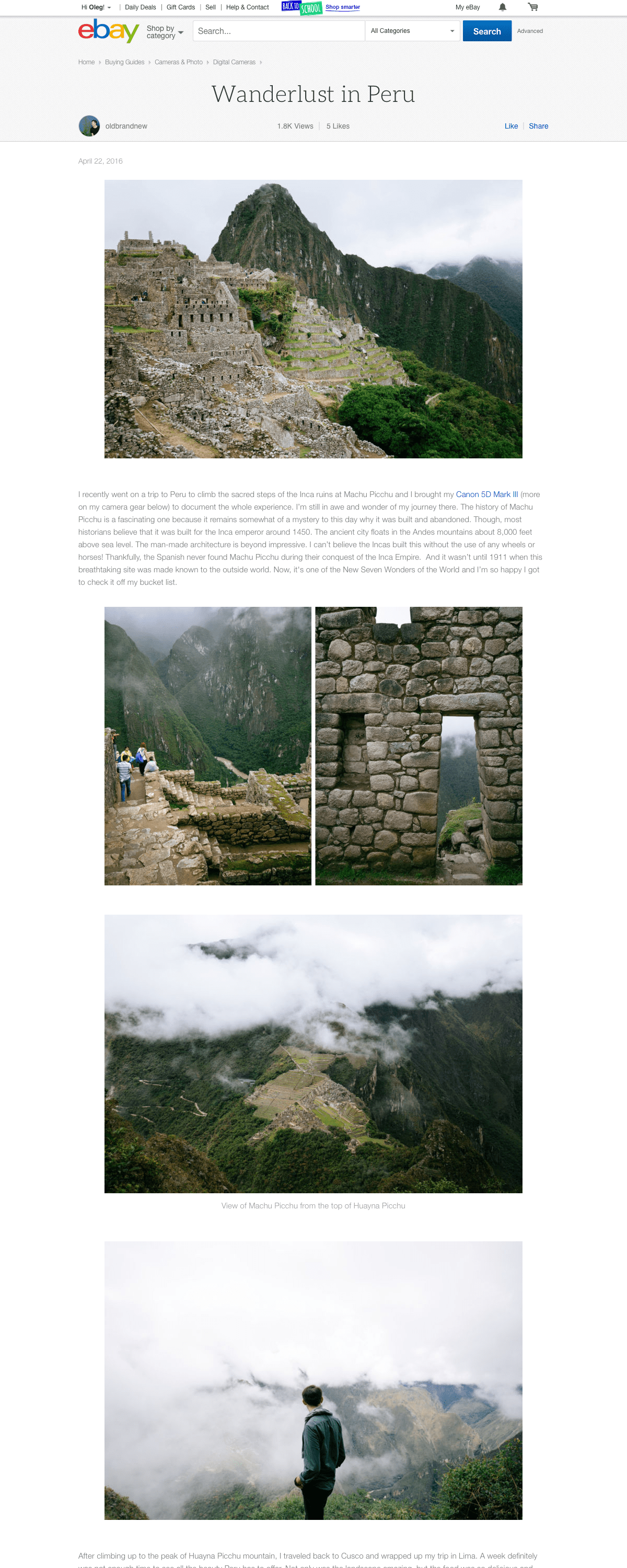
The most popular platform represented by over 500,000 published pieces. Publishing capabilities are equally open to all eBay users as well as premium content creators.
The most popular platform represented by over 500,000 published pieces. Publishing capabilities are equally open to all eBay users as well as premium content creators.
The most popular platform represented by over 500,000 published pieces. Publishing capabilities are equally open to all eBay users as well as premium content creators.
The most popular platform represented by over 500,000 published pieces. Publishing capabilities are equally open to all eBay users as well as premium content creators.
The most popular platform represented by over 500,000 published pieces. Publishing capabilities are equally open to all eBay users as well as premium content creators.
eBay Srories
eBay Srories
eBay Srories
eBay Srories
eBay Srories
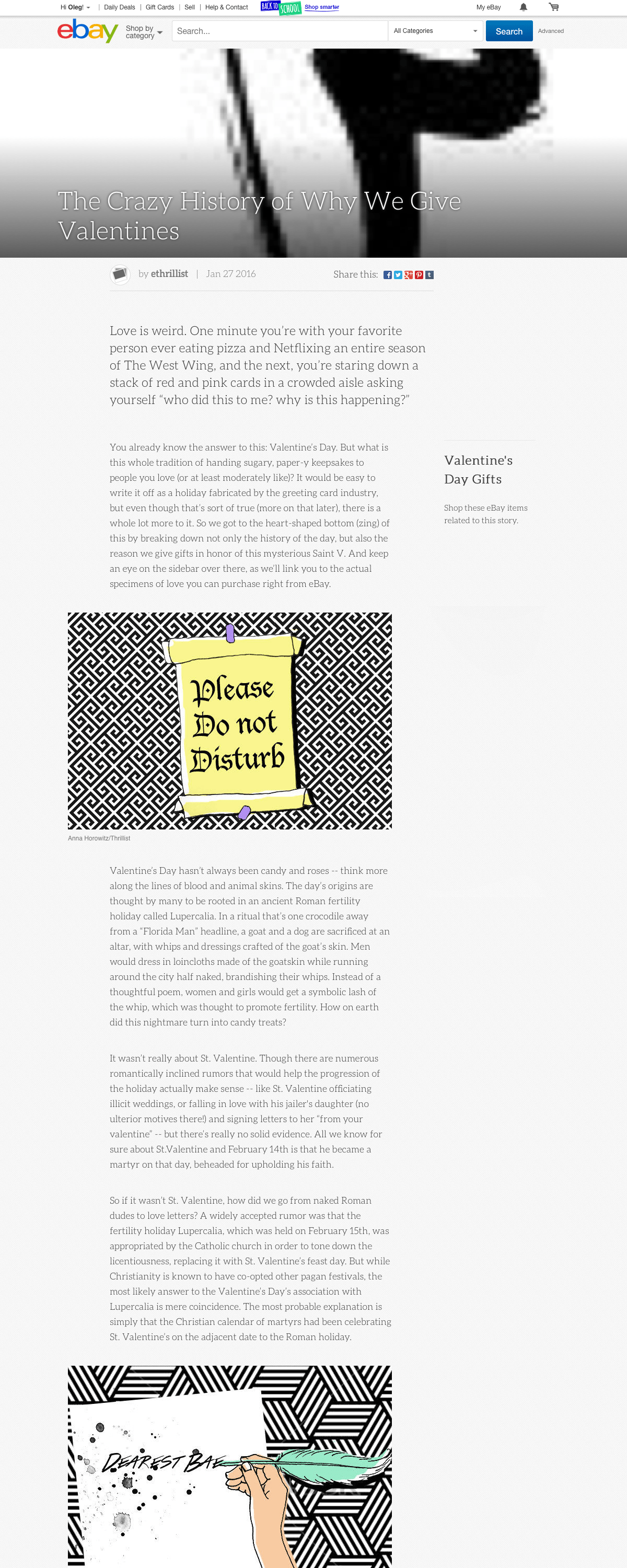
Represented by a limited number of professionally written articles. Stories ran on Wordpress CMS, causing serious security vulnerability to the eBay platform.
Represented by a limited number of professionally written articles. Stories ran on Wordpress CMS, causing serious security vulnerability to the eBay platform.
Represented by a limited number of professionally written articles. Stories ran on Wordpress CMS, causing serious security vulnerability to the eBay platform.
Represented by a limited number of professionally written articles. Stories ran on Wordpress CMS, causing serious security vulnerability to the eBay platform.
Represented by a limited number of professionally written articles. Stories ran on Wordpress CMS, causing serious security vulnerability to the eBay platform.
The purpose of Guides has evolved over the previous three years without any platform changes. The capabilities were limited and the pressures of keeping up with the production of quality content were impacting the stability. As the Guides platform has added the need to handle marketing content, there were gaps in functionality such as scheduling and marketing tools.
The purpose of Guides has evolved over the previous three years without any platform changes. The capabilities were limited and the pressures of keeping up with the production of quality content were impacting the stability. As the Guides platform has added the need to handle marketing content, there were gaps in functionality such as scheduling and marketing tools.
The purpose of Guides has evolved over the previous three years without any platform changes. The capabilities were limited and the pressures of keeping up with the production of quality content were impacting the stability. As the Guides platform has added the need to handle marketing content, there were gaps in functionality such as scheduling and marketing tools.
The purpose of Guides has evolved over the previous three years without any platform changes. The capabilities were limited and the pressures of keeping up with the production of quality content were impacting the stability. As the Guides platform has added the need to handle marketing content, there were gaps in functionality such as scheduling and marketing tools.
The purpose of Guides has evolved over the previous three years without any platform changes. The capabilities were limited and the pressures of keeping up with the production of quality content were impacting the stability. As the Guides platform has added the need to handle marketing content, there were gaps in functionality such as scheduling and marketing tools.

Key issues
Key issues
Key issues
Key issues
Key issues
- Redundancy
- No consistent eBay voice for reader
- Writers spend too long creating one guide
- Redundancy
- No consistent eBay voice for reader
- Writers spend too long creating one guide
- Redundancy
- No consistent eBay voice for reader
- Writers spend too long creating one guide
- Redundancy
- No consistent eBay voice for reader
- Writers spend too long creating one guide
- Redundancy
- No consistent eBay voice for reader
- Writers spend too long creating one guide
- Three teams working on three platforms
- Maintenance cost
- Bounce rate 90% from social / SEO traffic
- Three teams working on three platforms
- Maintenance cost
- Bounce rate 90% from social / SEO traffic
- Three teams working on three platforms
- Maintenance cost
- Bounce rate 90% from social / SEO traffic
- Three teams working on three platforms
- Maintenance cost
- Bounce rate 90% from social / SEO traffic
- Three teams working on three platforms
- Maintenance cost
- Bounce rate 90% from social / SEO traffic
Structure
Structure
Structure
Structure
Structure
This project was commissioned by the Content Marketing team, who expected to have at least 90% of all of the proposed features to be available in the first release. Because of the project's complexity and tight timeframe, we had to optimize our standard product development workflow to provide enough time for research, defining features, design, FE/BE development, and quality check.
This project was commissioned by the Content Marketing team, who expected to have at least 90% of all of the proposed features to be available in the first release. Because of the project's complexity and tight timeframe, we had to optimize our standard product development workflow to provide enough time for research, defining features, design, FE/BE development, and quality check.
This project was commissioned by the Content Marketing team, who expected to have at least 90% of all of the proposed features to be available in the first release. Because of the project's complexity and tight timeframe, we had to optimize our standard product development workflow to provide enough time for research, defining features, design, FE/BE development, and quality check.
This project was commissioned by the Content Marketing team, who expected to have at least 90% of all of the proposed features to be available in the first release. Because of the project's complexity and tight timeframe, we had to optimize our standard product development workflow to provide enough time for research, defining features, design, FE/BE development, and quality check.
This project was commissioned by the Content Marketing team, who expected to have at least 90% of all of the proposed features to be available in the first release. Because of the project's complexity and tight timeframe, we had to optimize our standard product development workflow to provide enough time for research, defining features, design, FE/BE development, and quality check.

UX vision
UX vision
UX vision
UX vision
UX vision
Create a world of shopping inspiration and education through an expansive breadth of high quality, contextually delivered content.
Create a world of shopping inspiration and education through an expansive breadth of high quality, contextually delivered content.
Create a world of shopping inspiration and education through an expansive breadth of high quality, contextually delivered content.
Create a world of shopping inspiration and education through an expansive breadth of high quality, contextually delivered content.
Create a world of shopping inspiration and education through an expansive breadth of high quality, contextually delivered content.

Mission
Mission
Mission
Mission
Mission
Build ONE reliable, functional, and flexible platform for different user types who can access articles in one place via desktop or mobile.
Build ONE reliable, functional, and flexible platform for different user types who can access articles in one place via desktop or mobile.
Build ONE reliable, functional, and flexible platform for different user types who can access articles in one place via desktop or mobile.
Build ONE reliable, functional, and flexible platform for different user types who can access articles in one place via desktop or mobile.
Build ONE reliable, functional, and flexible platform for different user types who can access articles in one place via desktop or mobile.

Research
Research
Research
Research
Research
Content analysis: compared content on Guides, Stories, and Lists and identified three general types of content: how-to, lists, and everything else.
Editor analysis: compared three platforms for usability, functionality, and flexibility. Tested popular blogging platforms.
Internal interviews: met with Marketing and SEO teams and identified their needs in higher flexibility, easier account management, metadata and link optimization.
External interviews: met with key influencers and consultants who communicated their needs in premium preview capabilities, having control over publishing, scheduling, and marketing methods.
Content analysis: compared content on Guides, Stories, and Lists and identified three general types of content: how-to, lists, and everything else.
Editor analysis: compared three platforms for usability, functionality, and flexibility. Tested popular blogging platforms.
Internal interviews: met with Marketing and SEO teams and identified their needs in higher flexibility, easier account management, metadata and link optimization.
External interviews: met with key influencers and consultants who communicated their needs in premium preview capabilities, having control over publishing, scheduling, and marketing methods.
Content analysis: compared content on Guides, Stories, and Lists and identified three general types of content: how-to, lists, and everything else.
Editor analysis: compared three platforms for usability, functionality, and flexibility. Tested popular blogging platforms.
Internal interviews: met with Marketing and SEO teams and identified their needs in higher flexibility, easier account management, metadata and link optimization.
External interviews: met with key influencers and consultants who communicated their needs in premium preview capabilities, having control over publishing, scheduling, and marketing methods.
Content analysis: compared content on Guides, Stories, and Lists and identified three general types of content: how-to, lists, and everything else.
Editor analysis: compared three platforms for usability, functionality, and flexibility. Tested popular blogging platforms.
Internal interviews: met with Marketing and SEO teams and identified their needs in higher flexibility, easier account management, metadata and link optimization.
External interviews: met with key influencers and consultants who communicated their needs in premium preview capabilities, having control over publishing, scheduling, and marketing methods.
Content analysis: compared content on Guides, Stories, and Lists and identified three general types of content: how-to, lists, and everything else.
Editor analysis: compared three platforms for usability, functionality, and flexibility. Tested popular blogging platforms.
Internal interviews: met with Marketing and SEO teams and identified their needs in higher flexibility, easier account management, metadata and link optimization.
External interviews: met with key influencers and consultants who communicated their needs in premium preview capabilities, having control over publishing, scheduling, and marketing methods.

Goals
Goals
Goals
Goals
Goals
Engage: reduce bounce rate
Simplify: reduce content creation time
Optimize: improve content experience
Engage: reduce bounce rate
Simplify: reduce content creation time
Optimize: improve content experience
Engage: reduce bounce rate
Simplify: reduce content creation time
Optimize: improve content experience
Engage: reduce bounce rate
Simplify: reduce content creation time
Optimize: improve content experience
Engage: reduce bounce rate
Simplify: reduce content creation time
Optimize: improve content experience

Success metric
Success metric
Success metric
Success metric
Success metric
Track performance by setting proper benchmarks and measuring their corresponding metrics against established KPI goals.
Track performance by setting proper benchmarks and measuring their corresponding metrics against established KPI goals.
Track performance by setting proper benchmarks and measuring their corresponding metrics against established KPI goals.
Track performance by setting proper benchmarks and measuring their corresponding metrics against established KPI goals.
Track performance by setting proper benchmarks and measuring their corresponding metrics against established KPI goals.

Account roles
Account roles
Account roles
Account roles
Account roles

Content Administrator
Content Administrator
Content Administrator
Content Administrator
Content Administrator
Represented by an internal account for employees responsible for:
1. Managing account status for contributors
2. Using bulk upload and redirect tools
3. Making modifications to content
4. Compliance with Community Content Policy
Represented by an internal account for employees responsible for:
1. Managing account status for contributors
2. Using bulk upload and redirect tools
3. Making modifications to content
4. Compliance with Community Content Policy
Represented by an internal account for employees responsible for:
1. Managing account status for contributors
2. Using bulk upload and redirect tools
3. Making modifications to content
4. Compliance with Community Content Policy
Represented by an internal account for employees responsible for:
1. Managing account status for contributors
2. Using bulk upload and redirect tools
3. Making modifications to content
4. Compliance with Community Content Policy
Represented by an internal account for employees responsible for:
1. Managing account status for contributors
2. Using bulk upload and redirect tools
3. Making modifications to content
4. Compliance with Community Content Policy

Premium Content Publisher
Premium Content Publisher
Premium Content Publisher
Premium Content Publisher
Premium Content Publisher
Represented by influencers, internal and agency content publishers who have access to:
1. Additional templates and modules
2. Scheduling privileges for content
3. Ability to add marketing images
4. Shared content on multiple accounts
Represented by influencers, internal and agency content publishers who have access to:
1. Additional templates and modules
2. Scheduling privileges for content
3. Ability to add marketing images
4. Shared content on multiple accounts
Represented by influencers, internal and agency content publishers who have access to:
1. Additional templates and modules
2. Scheduling privileges for content
3. Ability to add marketing images
4. Shared content on multiple accounts
Represented by influencers, internal and agency content publishers who have access to:
1. Additional templates and modules
2. Scheduling privileges for content
3. Ability to add marketing images
4. Shared content on multiple accounts
Represented by influencers, internal and agency content publishers who have access to:
1. Additional templates and modules
2. Scheduling privileges for content
3. Ability to add marketing images
4. Shared content on multiple accounts

Content Creator
Content Creator
Content Creator
Content Creator
Content Creator
Basic access level represented by sellers and buyers, who have access to:
1. Default article templates
2. Instant publishing
3. Posting static images, videos, and text
4. The entire set of rich content creation tools
Basic access level represented by sellers and buyers, who have access to:
1. Default article templates
2. Instant publishing
3. Posting static images, videos, and text
4. The entire set of rich content creation tools
Basic access level represented by sellers and buyers, who have access to:
1. Default article templates
2. Instant publishing
3. Posting static images, videos, and text
4. The entire set of rich content creation tools
Basic access level represented by sellers and buyers, who have access to:
1. Default article templates
2. Instant publishing
3. Posting static images, videos, and text
4. The entire set of rich content creation tools
Basic access level represented by sellers and buyers, who have access to:
1. Default article templates
2. Instant publishing
3. Posting static images, videos, and text
4. The entire set of rich content creation tools
User icons. Courtesy of Simon Child.
User icons. Courtesy of Simon Child.
User icons. Courtesy of Simon Child.
User icons. Courtesy of Simon Child.

Team structure
Team structure
Team structure
Team structure
Team structure
I worked closely with the Content Marketing Team, PO, FE/BE/QE engineers, Human Interaction Group, Accessibility, Legal, UX Research, and Localization teams.
I worked closely with the Content Marketing Team, PO, FE/BE/QE engineers, Human Interaction Group, Accessibility, Legal, UX Research, and Localization teams.
I worked closely with the Content Marketing Team, PO, FE/BE/QE engineers, Human Interaction Group, Accessibility, Legal, UX Research, and Localization teams.
As a Product Designer, I worked with cross-functional team consisting of: Product Owner, FE & BE engineering team, Human Interface Group, QE, Accessibility, Product and Design Leadership and Localization teams.
As a Product Designer, I worked with cross-functional team consisting of: Product Owner, FE & BE engineering team, Human Interface Group, QE, Accessibility, Product and Design Leadership and Localization teams.

Deliverables
Deliverables
Deliverables
Deliverables
Deliverables
As a Lead Designer, I was directly responsible for timely delivery of design and interaction specifications for both responsive desktop web and mobile web platforms.
As a Lead Designer, I was directly responsible for timely delivery of design and interaction specifications for both responsive desktop web and mobile web platforms.
As a Lead Designer, I was directly responsible for timely delivery of design and interaction specifications for both responsive desktop web and mobile web platforms.
As a Collections Lead Designer, I was responsible for timely delivery of design and interaction specifications for both Web (responsive desktop and mobile web) and Native experiences (iOS and Android apps).

Decision process
Decision process
Decision process
Design process
Design process
Because Guides CMS had hundreds of thousands of published pieces, we decided to build “Guides 2.0” or Articles – a zero-learning-curve modern CMS with enhanced performance and capabilities. As we defined our vision for Articles, we addressed all gaps in performance, User Experience, usability and accessibility.
Because Guides CMS had hundreds of thousands of published pieces, we decided to build “Guides 2.0” or Articles – a zero-learning-curve modern CMS with enhanced performance and capabilities. As we defined our vision for Articles, we addressed all gaps in performance, User Experience, usability and accessibility.
Because Guides CMS had hundreds of thousands of published pieces, we decided to build “Guides 2.0” or Articles – a zero-learning-curve modern CMS with enhanced performance and capabilities. As we defined our vision for Articles, we addressed all gaps in performance, User Experience, usability and accessibility.
Because Guides CMS had hundreds of thousands of published pieces, we decided to build “Guides 2.0” or Articles – a zero-learning-curve modern CMS with enhanced performance and capabilities. As we defined our vision for Articles, we addressed all gaps in performance, User Experience, usability and accessibility.
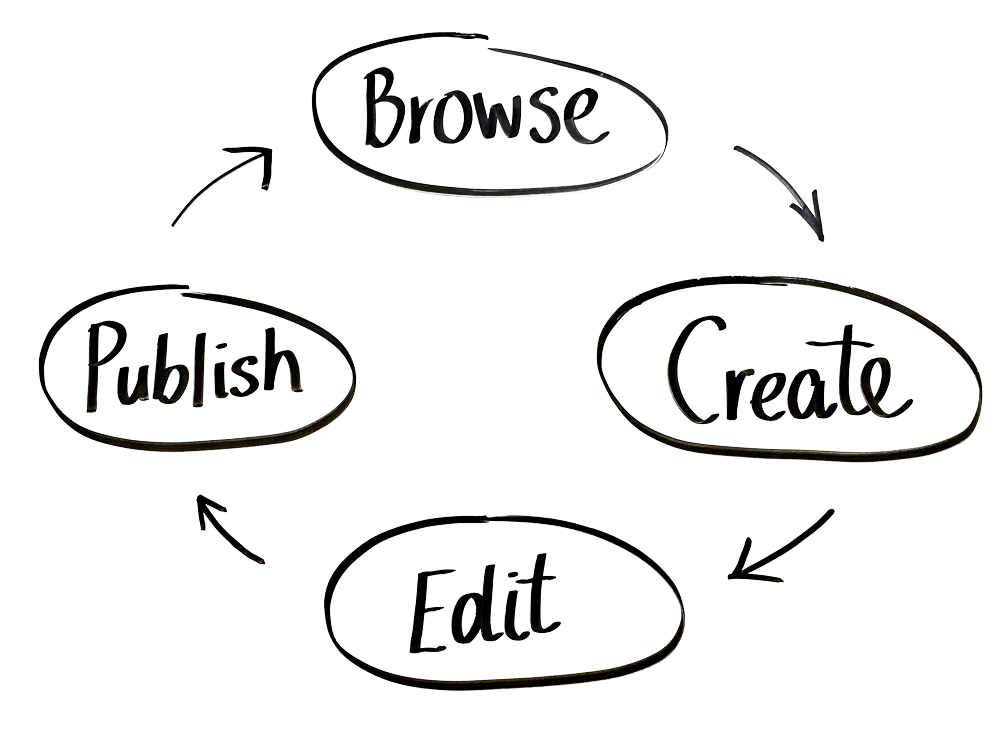
When defining Articles, we evaluated and enhanced every stage of the user journey on the front and back ends of the CMS. The front end features new layout, continuous browsing experience (see Collections) and the template picker. The back end features a very fast editor with enhanced capabilities and a flexible publishing tool.
When defining Articles, we evaluated and enhanced every stage of the user journey on the front and back ends of the CMS. The front end features new layout, continuous browsing experience (see Collections) and the template picker. The back end features a very fast editor with enhanced capabilities and a flexible publishing tool.
When defining Articles, we evaluated and enhanced every stage of the user journey on the front and back ends of the CMS. The front end features new layout, continuous browsing experience (see Collections) and the template picker. The back end features a very fast editor with enhanced capabilities and a flexible publishing tool.
As a Collections Lead Designer, I was responsible for timely delivery of design and interaction specifications for both Web (responsive desktop and mobile web) and Native experiences (iOS and Android apps).
Front end
Front end
Front end
Front end
Front end
In the first release, Articles was powered by continuous browsing experience, which was responsible for discovery of relevant content. In the future, we saw a great opportunity in diversifying content by merging Articles with Collections.
In the first release, Articles was powered by continuous browsing experience, which was responsible for discovery of relevant content. In the future, we saw a great opportunity in diversifying content by merging Articles with Collections.
In the first release, Articles was powered by continuous browsing experience, which was responsible for discovery of relevant content. In the future, we saw a great opportunity in diversifying content by merging Articles with Collections.
In the first release, Articles was powered by continuous browsing experience, which was responsible for discovery of relevant content. In the future, we saw a great opportunity in diversifying content by merging Articles with Collections.
In the first release, Articles was powered by continuous browsing experience, which was responsible for discovery of relevant content. In the future, we saw a great opportunity in diversifying content by merging Articles with Collections.
Templates
Templates
Templates
Templates
Templates
How could we merge three completely different page layouts into one family, while retaining their distinct purpose and appearance?
How could we merge three completely different page layouts into one family, while retaining their distinct purpose and appearance?
How could we merge three completely different page layouts into one family, while retaining their distinct purpose and appearance?
How could we merge three completely different page layouts into one family, while retaining their distinct purpose and appearance?
How could we merge three completely different page layouts into one family, while retaining their distinct purpose and appearance?
–
–
–
–
–
I designed three different page templates with roughly 90% stylistic and structural similarities and about 10% differences – just enough to tell them apart.
I designed three different page templates with roughly 90% stylistic and structural similarities and about 10% differences – just enough to tell them apart.
I designed three different page templates with roughly 90% stylistic and structural similarities and about 10% differences – just enough to tell them apart.
I designed three different page templates with roughly 90% stylistic and structural similarities and about 10% differences – just enough to tell them apart.
I designed three different page templates with roughly 90% stylistic and structural similarities and about 10% differences – just enough to tell them apart.
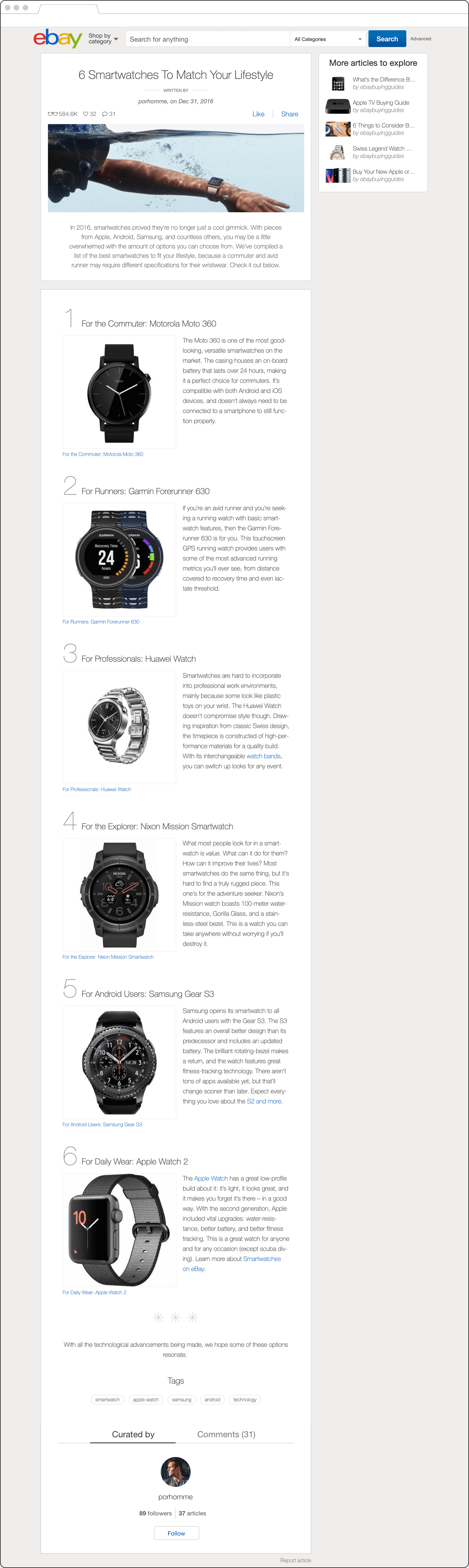
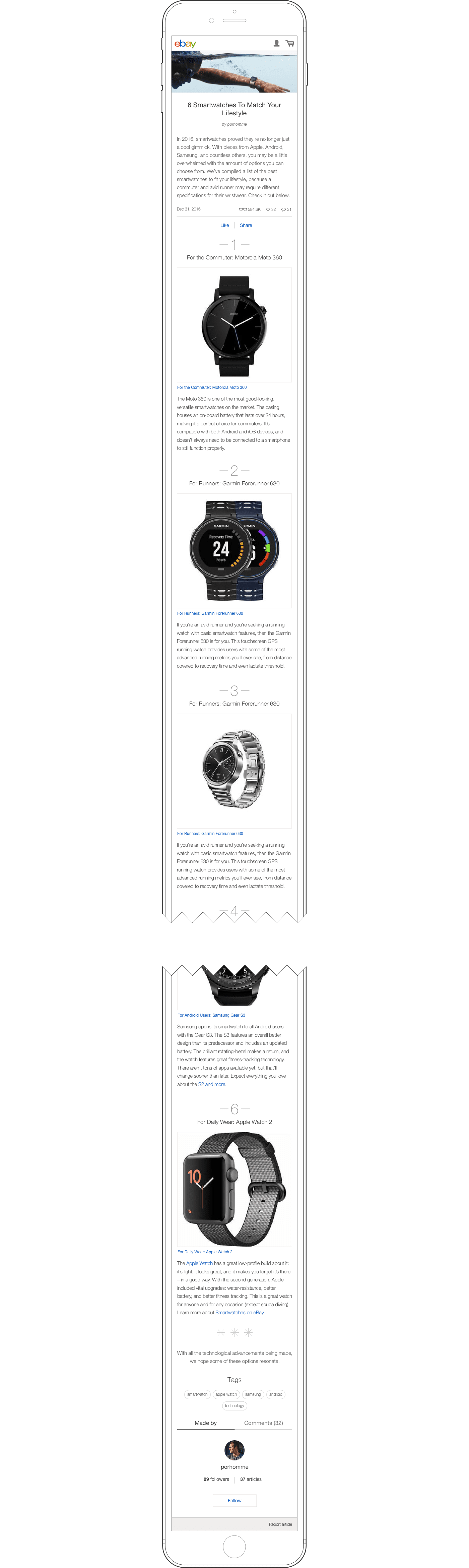
Editor's Picks
Editor's Picks
Editor's Picks
Editor's Picks
Editor's Picks
Replaces Lists. To be used when there is a need for a numbered series of sections with text and images. It features ascending or descending order and traditional list or staggered list layout treatments.
Replaces Lists. To be used when there is a need for a numbered series of sections with text and images. It features ascending or descending order and traditional list or staggered list layout treatments.
Replaces Lists. To be used when there is a need for a numbered series of sections with text and images. It features ascending or descending order and traditional list or staggered list layout treatments.
Replaces Lists. To be used when there is a need for a numbered series of sections with text and images. It features ascending or descending order and traditional list or staggered list layout treatments.
Replaces Lists. To be used when there is a need for a numbered series of sections with text and images. It features ascending or descending order and traditional list or staggered list layout treatments.
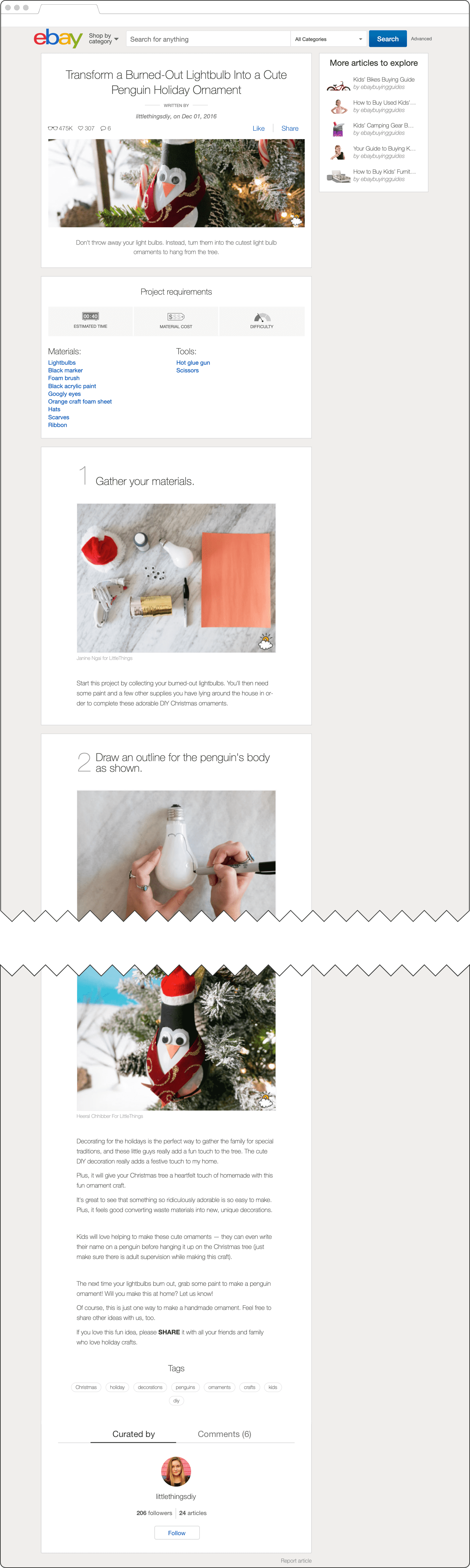
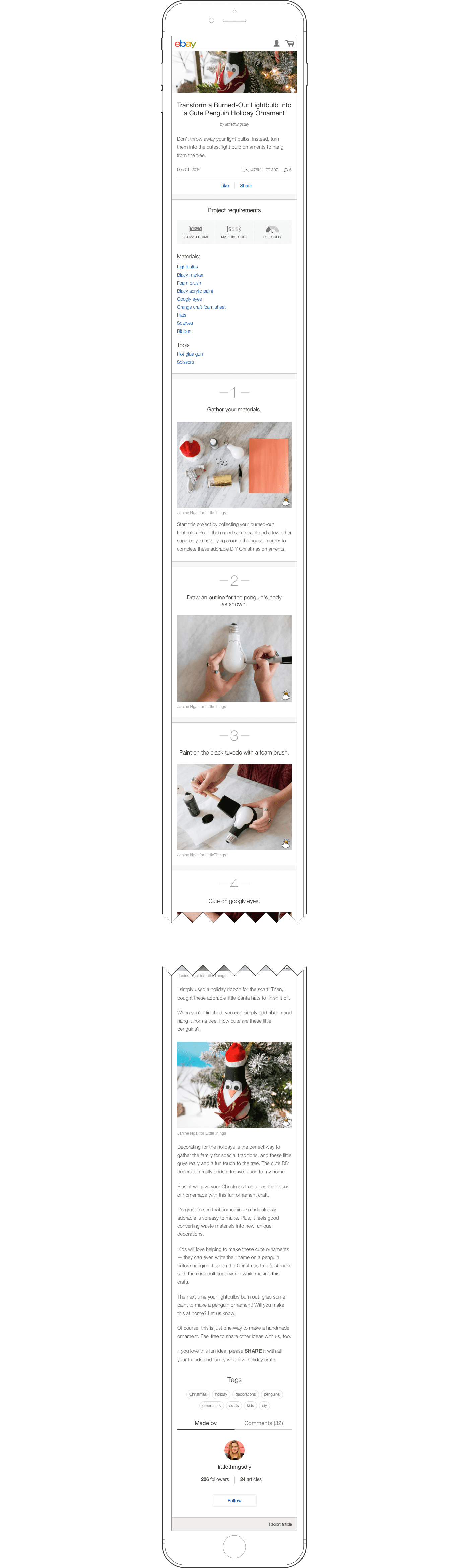
How-To
How-To
How-To
How-To
How-To
Replaces Guides. To be used for instructional guides including an optional list of materials and tools. The section with shoppable lists along with project info is set above the step-by-step content.
Replaces Guides. To be used for instructional guides including an optional list of materials and tools. The section with shoppable lists along with project info is set above the step-by-step content.
Replaces Guides. To be used for instructional guides including an optional list of materials and tools. The section with shoppable lists along with project info is set above the step-by-step content.
Replaces Guides. To be used for instructional guides including an optional list of materials and tools. The section with shoppable lists along with project info is set above the step-by-step content.
Replaces Guides. To be used for instructional guides including an optional list of materials and tools. The section with shoppable lists along with project info is set above the step-by-step content.
Blank
Blank
Blank
Blank
Blank
Replaces Stories. To be used for all other types of content. Having no restrictions in choice of components and content framing, this template affords for maximum creativity and self-expression.
Replaces Stories. To be used for all other types of content. Having no restrictions in choice of components and content framing, this template affords for maximum creativity and self-expression.
Replaces Stories. To be used for all other types of content. Having no restrictions in choice of components and content framing, this template affords for maximum creativity and self-expression.
Replaces Stories. To be used for all other types of content. Having no restrictions in choice of components and content framing, this template affords for maximum creativity and self-expression.
Replaces Stories. To be used for all other types of content. Having no restrictions in choice of components and content framing, this template affords for maximum creativity and self-expression.
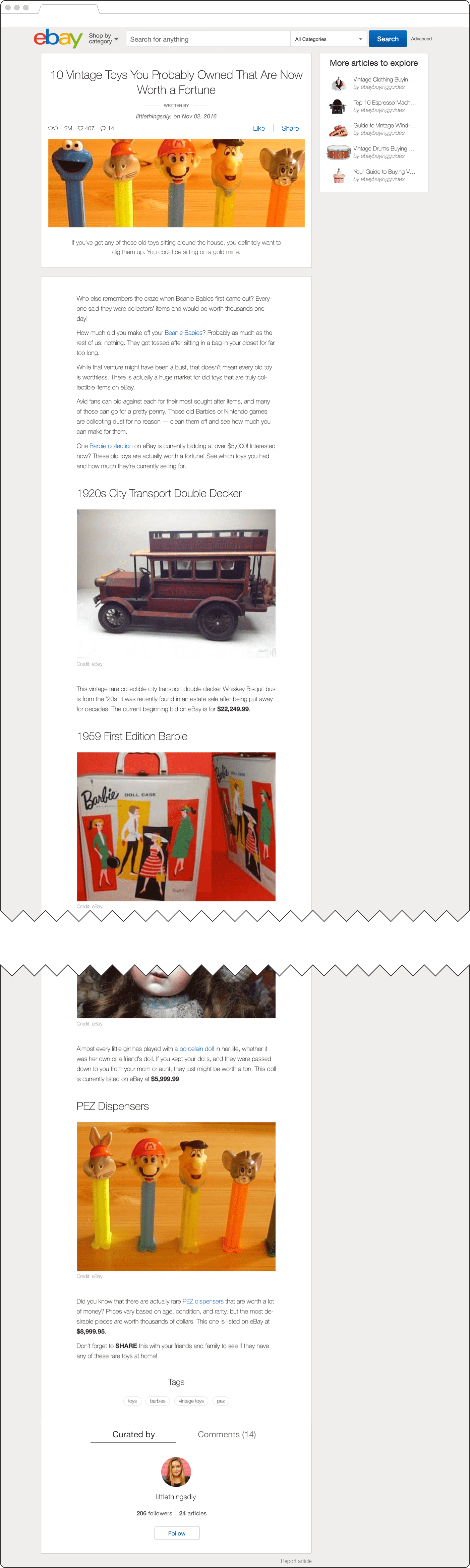
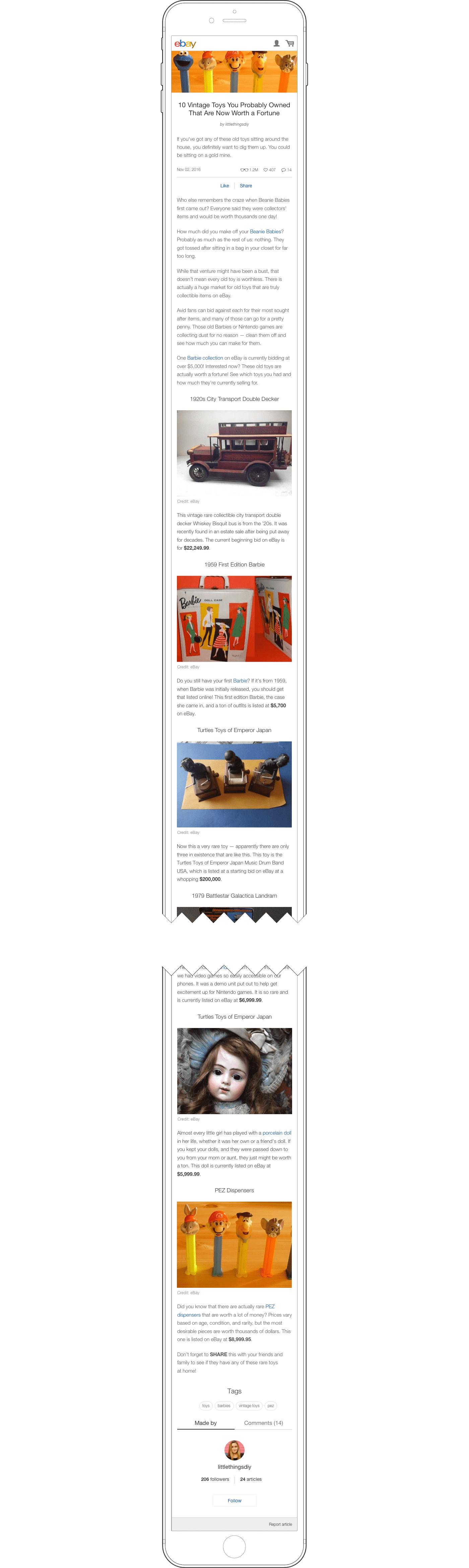
All three templates can be easily differentiated by minor visual attributes and content restrictions. Editor's Picks features extra-large numbers in either ascending or descending order and a single paragraph that doesn't exceed the image height for each list item. How-to can be easily identified by a very visible Project Requirements section and a separate content card for each step of the process. The Blank template is differentiated by missing all the above listed distinctive features from the other two templates.
All three templates can be easily differentiated by minor visual attributes and content restrictions. Editor's Picks features extra-large numbers in either ascending or descending order and a single paragraph that doesn't exceed the image height for each list item. How-to can be easily identified by a very visible Project Requirements section and a separate content card for each step of the process. The Blank template is differentiated by missing all the above listed distinctive features from the other two templates.
All three templates can be easily differentiated by minor visual attributes and content restrictions. Editor's Picks features extra-large numbers in either ascending or descending order and a single paragraph that doesn't exceed the image height for each list item. How-to can be easily identified by a very visible Project Requirements section and a separate content card for each step of the process. The Blank template is differentiated by missing all the above listed distinctive features from the other two templates.
All three templates can be easily differentiated by minor visual attributes and content restrictions. Editor's Picks features extra-large numbers in either ascending or descending order and a single paragraph that doesn't exceed the image height for each list item. How-to can be easily identified by a very visible Project Requirements section and a separate content card for each step of the process. The Blank template is differentiated by missing all the above listed distinctive features from the other two templates.
All three templates can be easily differentiated by minor visual attributes and content restrictions. Editor's Picks features extra-large numbers in either ascending or descending order and a single paragraph that doesn't exceed the image height for each list item. How-to can be easily identified by a very visible Project Requirements section and a separate content card for each step of the process. The Blank template is differentiated by missing all the above listed distinctive features from the other two templates.
Template picker
Template picker
Template picker
Template picker
Template picker
How could we help users to make an informed choice when selecting a template as they begin working on a new article?
How could we help users to make an informed choice when selecting a template as they begin working on a new article?
How could we help users to make an informed choice when selecting a template as they begin working on a new article?
How could we help users to make an informed choice when selecting a template as they begin working on a new article?
How could we help users to make an informed choice when selecting a template as they begin working on a new article?
–
–
–
–
The “Write an article” action to prompt a modal, leading to selection of the most suitable template based on the brief description of what each template is best for.
The “Write an article” action to prompt a modal, leading to selection of the most suitable template based on the brief description of what each template is best for.
The “Write an article” action to prompt a modal, leading to selection of the most suitable template based on the brief description of what each template is best for.
The “Write an article” action to prompt a modal, leading to selection of the most suitable template based on the brief description of what each template is best for.
The “Write an article” action to prompt a modal, leading to selection of the most suitable template based on the brief description of what each template is best for.

Having in mind that legacy Guides didn't have any template, I was considering retaining the same interaction experience and have the user to pick a template inside the article. However, I decided to add an extra step by prompting an interstitial step to avoid unnecessary technical challenges and confusion. The prototype above features modal interactions leading to the default state of each template.
Having in mind that legacy Guides didn't have any template, I was considering retaining the same interaction experience and have the user to pick a template inside the article. However, I decided to add an extra step by prompting an interstitial step to avoid unnecessary technical challenges and confusion. The prototype above features modal interactions leading to the default state of each template.
Having in mind that legacy Guides didn't have any template, I was considering retaining the same interaction experience and have the user to pick a template inside the article. However, I decided to add an extra step by prompting an interstitial step to avoid unnecessary technical challenges and confusion. The prototype above features modal interactions leading to the default state of each template.
Having in mind that legacy Guides didn't have any template, I was considering retaining the same interaction experience and have the user to pick a template inside the article. However, I decided to add an extra step by prompting an interstitial step to avoid unnecessary technical challenges and confusion. The prototype above features modal interactions leading to the default state of each template.
Having in mind that legacy Guides didn't have any template, I was considering retaining the same interaction experience and have the user to pick a template inside the article. However, I decided to add an extra step by prompting an interstitial step to avoid unnecessary technical challenges and confusion. The prototype above features modal interactions leading to the default state of each template.
Back end
Back end
Back end
Back end
Back end
The back end of the Articles experience is a highly interactive environment where account roles come into effect. It is largely represented by the content editor and publishing mechanism.
The back end of the Articles experience is a highly interactive environment where account roles come into effect. It is largely represented by the content editor and publishing mechanism.
The back end of the Articles experience is a highly interactive environment where account roles come into effect. It is largely represented by the content editor and publishing mechanism.
The back end of the Articles experience is a highly interactive environment where account roles come into effect. It is largely represented by the content editor and publishing mechanism.
The back end of the Articles experience is a highly interactive environment where account roles come into effect. It is largely represented by the content editor and publishing mechanism.
Comparing Articles with the deprecated Guides editor flows, we observed that the Articles editor afforded greater capabilities in rich content creation at higher performance speeds. The Articles editor consists of a header, Project Requirements section (in How-To template), article body and pre-populated footer. The article body features non-linear component insertion, a component drawer with up to 11 components (depending on the template) and a contextual content formatting toolbar. Unlike Guides, all the formatting UI is very pronounced; therefore, article preview mode has been designed to display the article in desktop and mobile views without embedded editing interface and extra spacing.
Comparing Articles with the deprecated Guides editor flows, we observed that the Articles editor afforded greater capabilities in rich content creation at higher performance speeds. The Articles editor consists of a header, Project Requirements section (in How-To template), article body and pre-populated footer. The article body features non-linear component insertion, a component drawer with up to 11 components (depending on the template) and a contextual content formatting toolbar. Unlike Guides, all the formatting UI is very pronounced; therefore, article preview mode has been designed to display the article in desktop and mobile views without embedded editing interface and extra spacing.
Comparing Articles with the deprecated Guides editor flows, we observed that the Articles editor afforded greater capabilities in rich content creation at higher performance speeds. The Articles editor consists of a header, Project Requirements section (in How-To template), article body and pre-populated footer. The article body features non-linear component insertion, a component drawer with up to 11 components (depending on the template) and a contextual content formatting toolbar. Unlike Guides, all the formatting UI is very pronounced; therefore, article preview mode has been designed to display the article in desktop and mobile views without embedded editing interface and extra spacing.
Comparing Articles with the deprecated Guides editor flows, we observed that the Articles editor afforded greater capabilities in rich content creation at higher performance speeds. The Articles editor consists of a header, Project Requirements section (in How-To template), article body and pre-populated footer. The article body features non-linear component insertion, a component drawer with up to 11 components (depending on the template) and a contextual content formatting toolbar. Unlike Guides, all the formatting UI is very pronounced; therefore, article preview mode has been designed to display the article in desktop and mobile views without embedded editing interface and extra spacing.
Comparing Articles with the deprecated Guides editor flows, we observed that the Articles editor afforded greater capabilities in rich content creation at higher performance speeds. The Articles editor consists of a header, Project Requirements section (in How-To template), article body and pre-populated footer. The article body features non-linear component insertion, a component drawer with up to 11 components (depending on the template) and a contextual content formatting toolbar. Unlike Guides, all the formatting UI is very pronounced; therefore, article preview mode has been designed to display the article in desktop and mobile views without embedded editing interface and extra spacing.
Header and footer
Header and footer
Header and footer
Header and footer
Header and footer
How could we better communicate where an old article ends and new articles begins when viewing inside the continuous browsing experience?
How could we better communicate where an old article ends and new articles begins when viewing inside the continuous browsing experience?
How could we better communicate where an old article ends and new articles begins when viewing inside the continuous browsing experience?
How could we better communicate where an old article ends and new articles begins when viewing inside the continuous browsing experience?
How could we better communicate where an old article ends and new articles begins when viewing inside the continuous browsing experience?
–
–
–
–
–
While setting the voice and tone of the written piece, a well pronounced article header and footer makes it impossible to miss a break between two different articles.
While setting the voice and tone of the written piece, a well pronounced article header and footer makes it impossible to miss a break between two different articles.
While setting the voice and tone of the written piece, a well pronounced article header and footer makes it impossible to miss a break between two different articles.
While setting the voice and tone of the written piece, a well pronounced article header and footer makes it impossible to miss a break between two different articles.
While setting the voice and tone of the written piece, a well pronounced article header and footer makes it impossible to miss a break between two different articles.
Header section
Header section
Header section
Header section
Header section
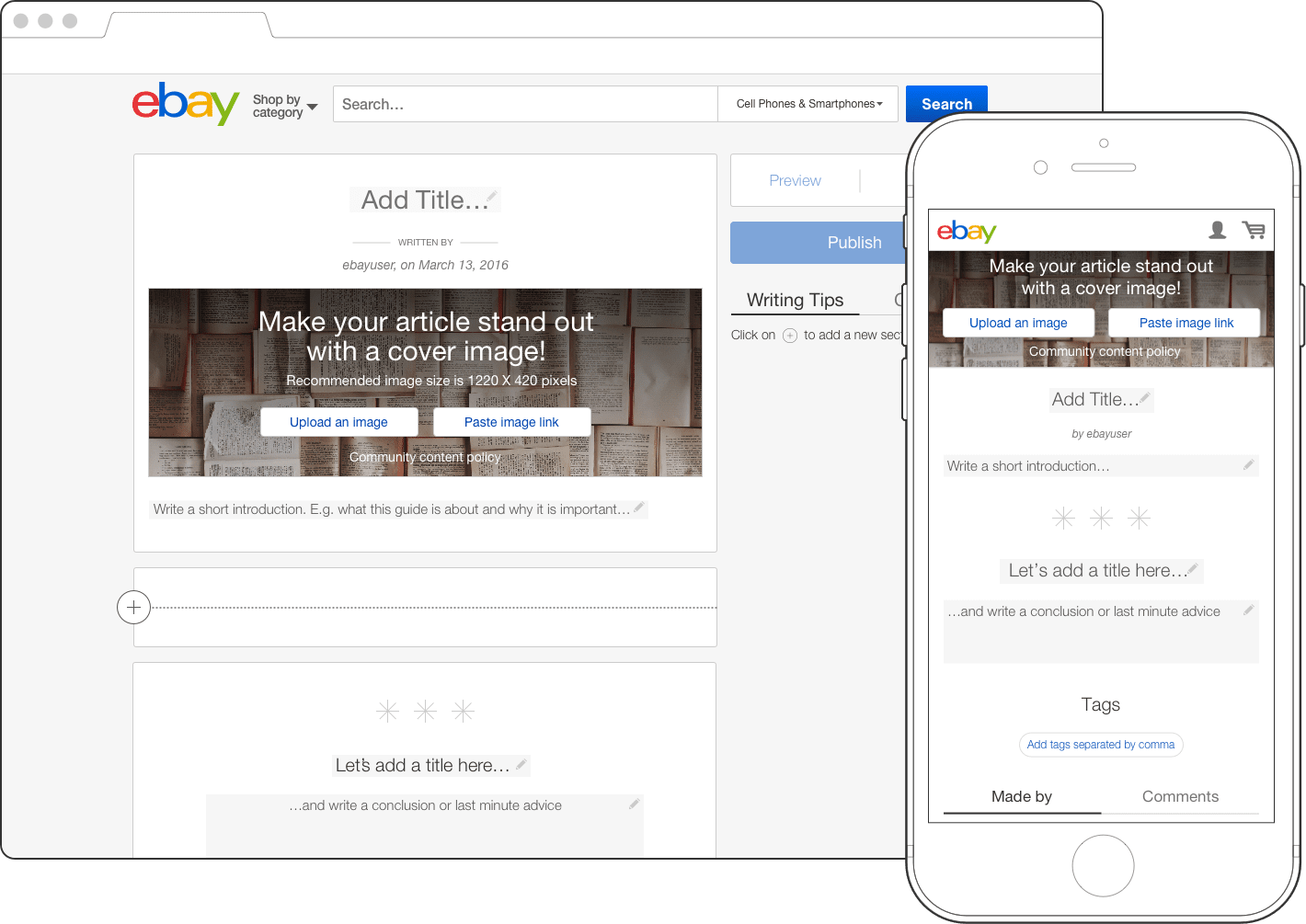
The article header sets the mood of the written piece while clearly indicating the beginning of a new article. Having planned to combine Articles and Collections inside the continuous browsing flow, we decided to follow Collections layout structure, including the header, to ensure a consistent experience. Per our editorial guidelines, the user must fill out each area of the header: article title, header image, and article introduction.
The article header sets the mood of the written piece while clearly indicating the beginning of a new article. Having planned to combine Articles and Collections inside the continuous browsing flow, we decided to follow Collections layout structure, including the header, to ensure a consistent experience. Per our editorial guidelines, the user must fill out each area of the header: article title, header image, and article introduction.
The article header sets the mood of the written piece while clearly indicating the beginning of a new article. Having planned to combine Articles and Collections inside the continuous browsing flow, we decided to follow Collections layout structure, including the header, to ensure a consistent experience. Per our editorial guidelines, the user must fill out each area of the header: article title, header image, and article introduction.
The article header sets the mood of the written piece while clearly indicating the beginning of a new article. Having planned to combine Articles and Collections inside the continuous browsing flow, we decided to follow Collections layout structure, including the header, to ensure a consistent experience. Per our editorial guidelines, the user must fill out each area of the header: article title, header image, and article introduction.
The article header sets the mood of the written piece while clearly indicating the beginning of a new article. Having planned to combine Articles and Collections inside the continuous browsing flow, we decided to follow Collections layout structure, including the header, to ensure a consistent experience. Per our editorial guidelines, the user must fill out each area of the header: article title, header image, and article introduction.
Project requirements
Project requirements
Project requirements
Project requirements
Project requirements
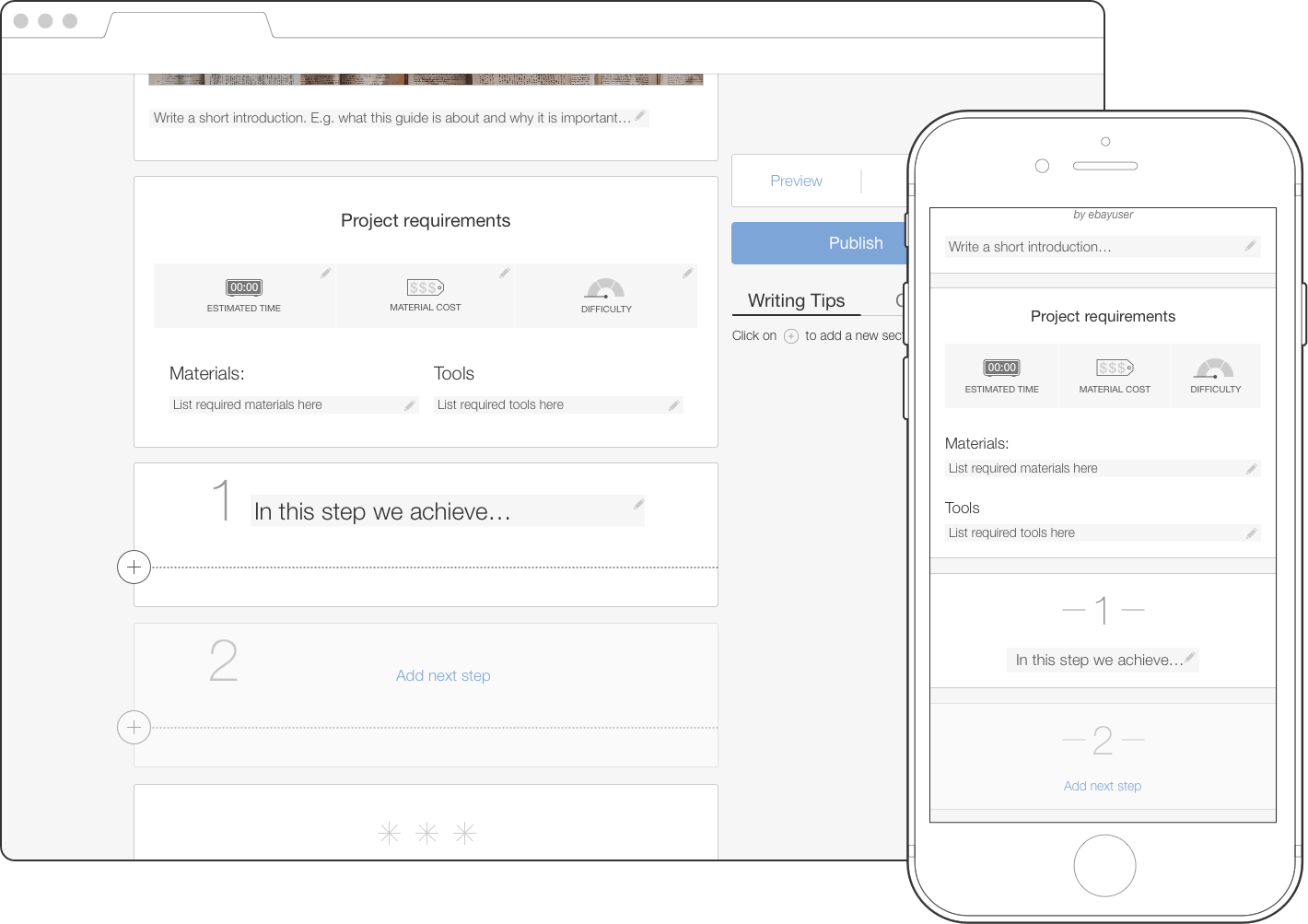
This section appears immediately below the article header, inside the How-To template. Just like any cookbook or DIY tutorial, it lists all the requirements for successful completion of the project described in the article before reading it. From this section the reader learns how much time it takes to complete the project, material cost and difficulty level followed by list of tools and materials. When listing tools and materials, the writer can either provide a direct link to either specific eBay listings or can simply add a keyword, which would take the reader to a search results page for this keyword. Because some tutorials don't require any investment (e.g. how to win rock paper scissors each time) any part of this section is optional.
This section appears immediately below the article header, inside the How-To template. Just like any cookbook or DIY tutorial, it lists all the requirements for successful completion of the project described in the article before reading it. From this section the reader learns how much time it takes to complete the project, material cost and difficulty level followed by list of tools and materials. When listing tools and materials, the writer can either provide a direct link to either specific eBay listings or can simply add a keyword, which would take the reader to a search results page for this keyword. Because some tutorials don't require any investment (e.g. how to win rock paper scissors each time) any part of this section is optional.
This section appears immediately below the article header, inside the How-To template. Just like any cookbook or DIY tutorial, it lists all the requirements for successful completion of the project described in the article before reading it. From this section the reader learns how much time it takes to complete the project, material cost and difficulty level followed by list of tools and materials. When listing tools and materials, the writer can either provide a direct link to either specific eBay listings or can simply add a keyword, which would take the reader to a search results page for this keyword. Because some tutorials don't require any investment (e.g. how to win rock paper scissors each time) any part of this section is optional.
This section appears immediately below the article header, inside the How-To template. Just like any cookbook or DIY tutorial, it lists all the requirements for successful completion of the project described in the article before reading it. From this section the reader learns how much time it takes to complete the project, material cost and difficulty level followed by list of tools and materials. When listing tools and materials, the writer can either provide a direct link to either specific eBay listings or can simply add a keyword, which would take the reader to a search results page for this keyword. Because some tutorials don't require any investment (e.g. how to win rock paper scissors each time) any part of this section is optional.
This section appears immediately below the article header, inside the How-To template. Just like any cookbook or DIY tutorial, it lists all the requirements for successful completion of the project described in the article before reading it. From this section the reader learns how much time it takes to complete the project, material cost and difficulty level followed by list of tools and materials. When listing tools and materials, the writer can either provide a direct link to either specific eBay listings or can simply add a keyword, which would take the reader to a search results page for this keyword. Because some tutorials don't require any investment (e.g. how to win rock paper scissors each time) any part of this section is optional.
Footer section
Footer section
Footer section
Footer section
Footer section
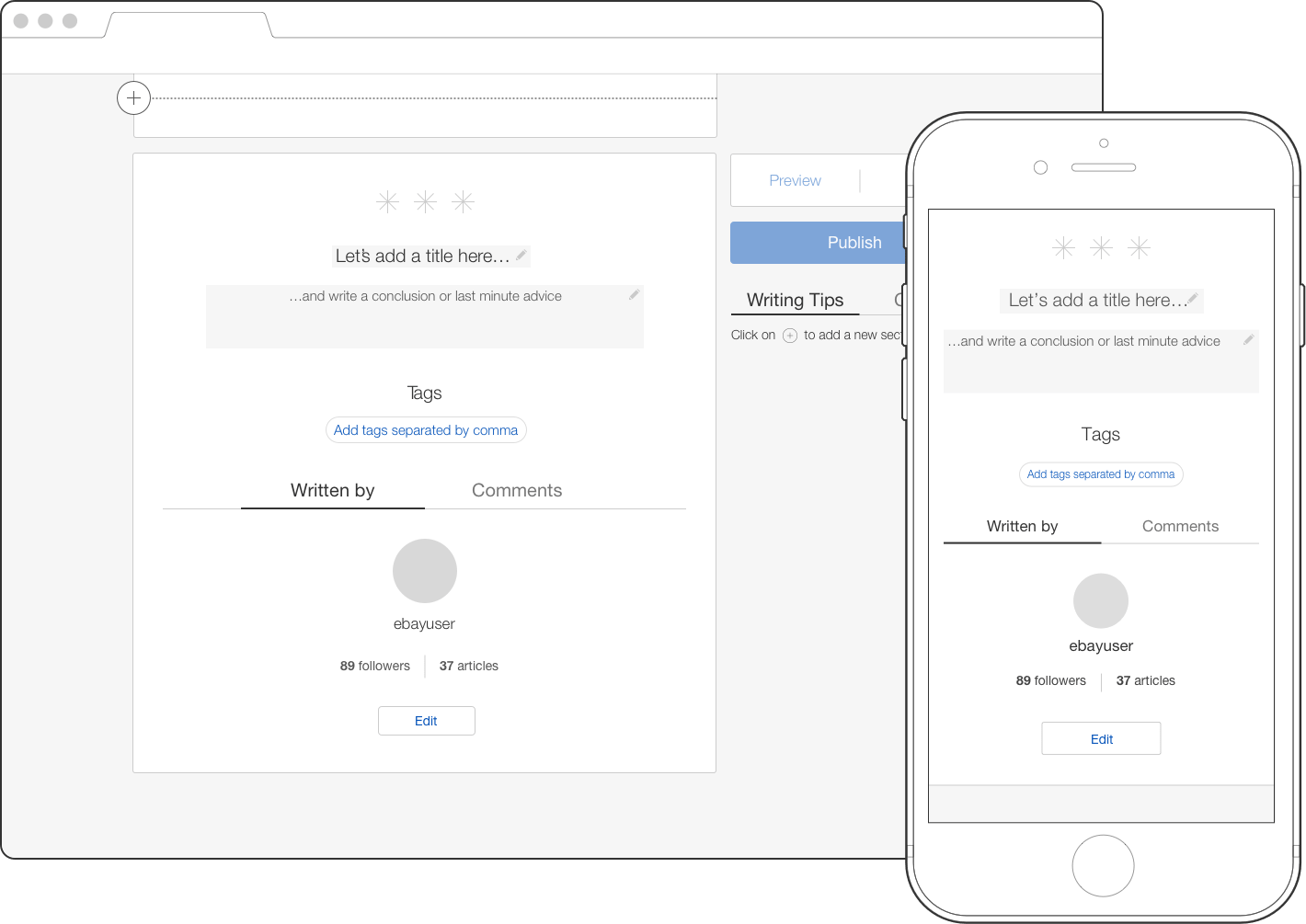
Similar to the article header, the footer section matches the Collections footer with a few article-specific additions: an optional conclusion section and actionable tags. Tags are represented by the article describing keywords, which serve a dual purpose: discoverability by search engines and as a means to discover other articles that share the same tags. In the first release these tags were strictly manual and the user was required to enter at least three tags. The later release would make user input optional thanks to an auto-tagging mechanism.
Similar to the article header, the footer section matches the Collections footer with a few article-specific additions: an optional conclusion section and actionable tags. Tags are represented by the article describing keywords, which serve a dual purpose: discoverability by search engines and as a means to discover other articles that share the same tags. In the first release these tags were strictly manual and the user was required to enter at least three tags. The later release would make user input optional thanks to an auto-tagging mechanism.
Similar to the article header, the footer section matches the Collections footer with a few article-specific additions: an optional conclusion section and actionable tags. Tags are represented by the article describing keywords, which serve a dual purpose: discoverability by search engines and as a means to discover other articles that share the same tags. In the first release these tags were strictly manual and the user was required to enter at least three tags. The later release would make user input optional thanks to an auto-tagging mechanism.
Similar to the article header, the footer section matches the Collections footer with a few article-specific additions: an optional conclusion section and actionable tags. Tags are represented by the article describing keywords, which serve a dual purpose: discoverability by search engines and as a means to discover other articles that share the same tags. In the first release these tags were strictly manual and the user was required to enter at least three tags. The later release would make user input optional thanks to an auto-tagging mechanism.
Similar to the article header, the footer section matches the Collections footer with a few article-specific additions: an optional conclusion section and actionable tags. Tags are represented by the article describing keywords, which serve a dual purpose: discoverability by search engines and as a means to discover other articles that share the same tags. In the first release these tags were strictly manual and the user was required to enter at least three tags. The later release would make user input optional thanks to an auto-tagging mechanism.
Editing tools
Editing tools
Editing tools
Editing tools
Editing tools
How could we empower writers to focus on a struggle-free creative process rather than spending time on workarounds to overcome platform shortcomings?
How could we empower writers to focus on a struggle-free creative process rather than spending time on workarounds to overcome platform shortcomings?
How could we empower writers to focus on a struggle-free creative process rather than spending time on workarounds to overcome platform shortcomings?
How could we empower writers to focus on a struggle-free creative process rather than spending time on workarounds to overcome platform shortcomings?
How could we empower writers to focus on a struggle-free creative process rather than spending time on workarounds to overcome platform shortcomings?
–
–
–
–
–
Careful analysis of Guides flaws and user needs led us to add more flexibility to Articles content creation process and expansion of editing tools.
Careful analysis of Guides flaws and user needs led us to add more flexibility to Articles content creation process and expansion of editing tools.
Careful analysis of Guides flaws and user needs led us to add more flexibility to Articles content creation process and expansion of editing tools.
Careful analysis of Guides flaws and user needs led us to add more flexibility to Articles content creation process and expansion of editing tools.
Careful analysis of Guides flaws and user needs led us to add more flexibility to Articles content creation process and expansion of editing tools.
Components
Components
Components
Components
Components
The content creation flow in both Guides and Articles is a two-step process: adding content components from the components drawer and formatting it via the formatting toolbar. While retaining the simplicity of this process, we improved the usability of component insertion and tripled the number of components to represent more types of article content. If the old Guides only allowed new content insertion at the bottom of the article, the new Articles afforded content addition in between existing sections. Some templates are more restricted than others, which also affects the number of available components. E.g. as the most restrictive template, the Editor's Picks component drawer is limited to only two components, while the Blank template contains all 11. In the first release, we did not permit the introduction of new sections into existing articles; however, we enabled the ability to edit existing content via the Formatting tool to allow content editing while on the go.
The content creation flow in both Guides and Articles is a two-step process: adding content components from the components drawer and formatting it via the formatting toolbar. While retaining the simplicity of this process, we improved the usability of component insertion and tripled the number of components to represent more types of article content. If the old Guides only allowed new content insertion at the bottom of the article, the new Articles afforded content addition in between existing sections. Some templates are more restricted than others, which also affects the number of available components. E.g. as the most restrictive template, the Editor's Picks component drawer is limited to only two components, while the Blank template contains all 11. In the first release, we did not permit the introduction of new sections into existing articles; however, we enabled the ability to edit existing content via the Formatting tool to allow content editing while on the go.
The content creation flow in both Guides and Articles is a two-step process: adding content components from the components drawer and formatting it via the formatting toolbar. While retaining the simplicity of this process, we improved the usability of component insertion and tripled the number of components to represent more types of article content. If the old Guides only allowed new content insertion at the bottom of the article, the new Articles afforded content addition in between existing sections. Some templates are more restricted than others, which also affects the number of available components. E.g. as the most restrictive template, the Editor's Picks component drawer is limited to only two components, while the Blank template contains all 11. In the first release, we did not permit the introduction of new sections into existing articles; however, we enabled the ability to edit existing content via the Formatting tool to allow content editing while on the go.
The content creation flow in both Guides and Articles is a two-step process: adding content components from the components drawer and formatting it via the formatting toolbar. While retaining the simplicity of this process, we improved the usability of component insertion and tripled the number of components to represent more types of article content. If the old Guides only allowed new content insertion at the bottom of the article, the new Articles afforded content addition in between existing sections. Some templates are more restricted than others, which also affects the number of available components. E.g. as the most restrictive template, the Editor's Picks component drawer is limited to only two components, while the Blank template contains all 11. In the first release, we did not permit the introduction of new sections into existing articles; however, we enabled the ability to edit existing content via the Formatting tool to allow content editing while on the go.
The content creation flow in both Guides and Articles is a two-step process: adding content components from the components drawer and formatting it via the formatting toolbar. While retaining the simplicity of this process, we improved the usability of component insertion and tripled the number of components to represent more types of article content. If the old Guides only allowed new content insertion at the bottom of the article, the new Articles afforded content addition in between existing sections. Some templates are more restricted than others, which also affects the number of available components. E.g. as the most restrictive template, the Editor's Picks component drawer is limited to only two components, while the Blank template contains all 11. In the first release, we did not permit the introduction of new sections into existing articles; however, we enabled the ability to edit existing content via the Formatting tool to allow content editing while on the go.
Formatting
Formatting
Formatting
Formatting
Formatting
We greatly enhanced content editing abilities by improving the content formatting mechanism. In Guides the formatting toolbar was always displayed on top of the page which negatively affected the usability. In Articles, the formatting toolbar has contextual placement and always appears below the section in focus. Some sections also feature contextual formatting tools: e.g. in text block section, one set of actions is designated for paragraph formatting and another set is responsible for selection formatting.
We greatly enhanced content editing abilities by improving the content formatting mechanism. In Guides the formatting toolbar was always displayed on top of the page which negatively affected the usability. In Articles, the formatting toolbar has contextual placement and always appears below the section in focus. Some sections also feature contextual formatting tools: e.g. in text block section, one set of actions is designated for paragraph formatting and another set is responsible for selection formatting.
We greatly enhanced content editing abilities by improving the content formatting mechanism. In Guides the formatting toolbar was always displayed on top of the page which negatively affected the usability. In Articles, the formatting toolbar has contextual placement and always appears below the section in focus. Some sections also feature contextual formatting tools: e.g. in text block section, one set of actions is designated for paragraph formatting and another set is responsible for selection formatting.
We greatly enhanced content editing abilities by improving the content formatting mechanism. In Guides the formatting toolbar was always displayed on top of the page which negatively affected the usability. In Articles, the formatting toolbar has contextual placement and always appears below the section in focus. Some sections also feature contextual formatting tools: e.g. in text block section, one set of actions is designated for paragraph formatting and another set is responsible for selection formatting.
We greatly enhanced content editing abilities by improving the content formatting mechanism. In Guides the formatting toolbar was always displayed on top of the page which negatively affected the usability. In Articles, the formatting toolbar has contextual placement and always appears below the section in focus. Some sections also feature contextual formatting tools: e.g. in text block section, one set of actions is designated for paragraph formatting and another set is responsible for selection formatting.
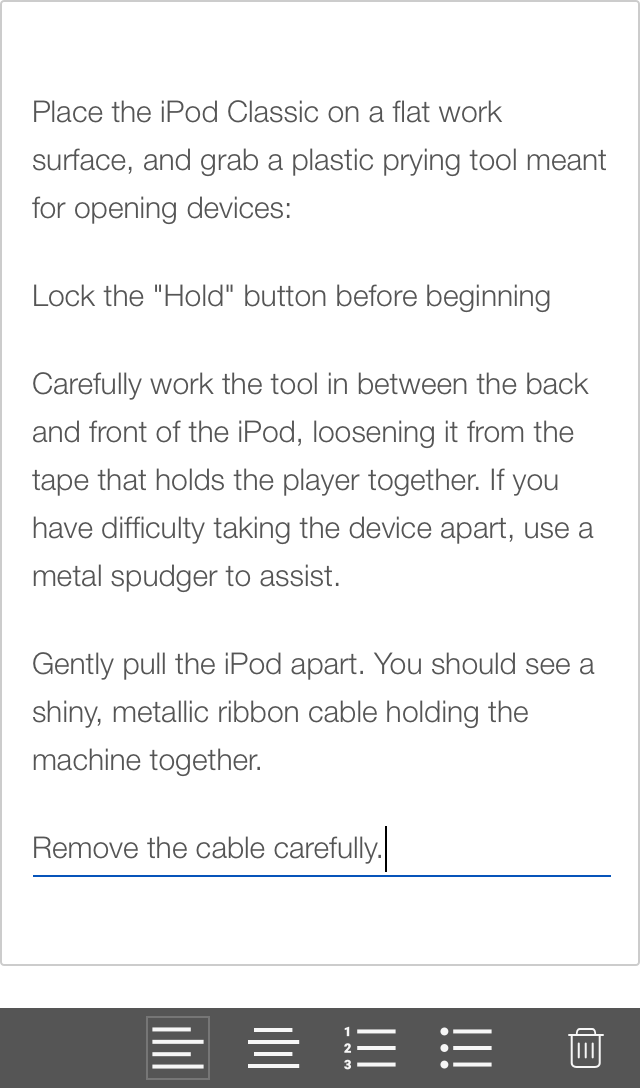
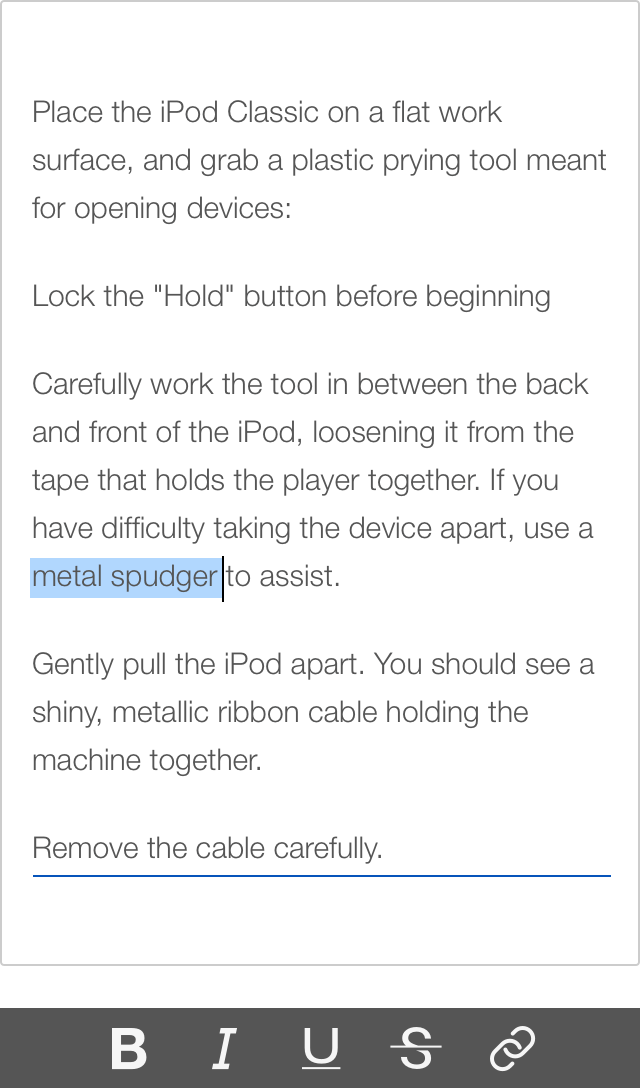
In mobile editor, we achieved full parity with desktop version in regards to formatting tools. In this example, the extra long paragraph formatting toolset shows only one action group at time – one for paragraph and another for selection editing.
In mobile editor, we achieved full parity with desktop version in regards to formatting tools. In this example, the extra long paragraph formatting toolset shows only one action group at time – one for paragraph and another for selection editing.
In mobile editor, we achieved full parity with desktop version in regards to formatting tools. In this example, the extra long paragraph formatting toolset shows only one action group at time – one for paragraph and another for selection editing.
In mobile editor, we achieved full parity with desktop version in regards to formatting tools. In this example, the extra long paragraph formatting toolset shows only one action group at time – one for paragraph and another for selection editing.
In mobile editor, we achieved full parity with desktop version in regards to formatting tools. In this example, the extra long paragraph formatting toolset shows only one action group at time – one for paragraph and another for selection editing.
Preivew
Preivew
Preivew
Preivew
Preivew
How could we provide writers with a clear vision of how a published article would look?
How could we provide writers with a clear vision of how a published article would look?
How could we provide writers with a clear vision of how a published article would look?
How could we provide writers with a clear vision of how a published article would look?
How could we provide writers with a clear vision of how a published article would look?
–
–
–
–
–
We introduced an article preview mode which emulates a published article on desktop and mobile phone.
We introduced an article preview mode which emulates a published article on desktop and mobile phone.
We introduced an article preview mode which emulates a published article on desktop and mobile phone.
We introduced an article preview mode which emulates a published article on desktop and mobile phone.
We introduced an article preview mode which emulates a published article on desktop and mobile phone.

The need for the preview mode came about due support for mobile version and well pronounced formatting UI surrounded by generous spacing. The article preview mode is highly critical for the writers because it is the only means to review the written piece without publishing it.
The need for the preview mode came about due support for mobile version and well pronounced formatting UI surrounded by generous spacing. The article preview mode is highly critical for the writers because it is the only means to review the written piece without publishing it.
The need for the preview mode came about due support for mobile version and well pronounced formatting UI surrounded by generous spacing. The article preview mode is highly critical for the writers because it is the only means to review the written piece without publishing it.
The need for the preview mode came about due support for mobile version and well pronounced formatting UI surrounded by generous spacing. The article preview mode is highly critical for the writers because it is the only means to review the written piece without publishing it.
The need for the preview mode came about due support for mobile version and well pronounced formatting UI surrounded by generous spacing. The article preview mode is highly critical for the writers because it is the only means to review the written piece without publishing it.
Premium features
Premium features
Premium features
Premium features
Premium features
How could we design a usable and useful set of tools for Premium Content Publishers and gracefully integrate these features with a newly built Articles editor?
How could we design a usable and useful set of tools for Premium Content Publishers and gracefully integrate these features with a newly built Articles editor?
How could we design a usable and useful set of tools for Premium Content Publishers and gracefully integrate these features with a newly built Articles editor?
How could we design a usable and useful set of tools for Premium Content Publishers and gracefully integrate these features with a newly built Articles editor?
How could we design a usable and useful set of tools for Premium Content Publishers and gracefully integrate these features with a newly built Articles editor?
–
–
–
–
–
According to our hypothesis, a streamlined and simplified item replacement process may motivate collection creators to keep collection items in active or shoppable state.
According to our hypothesis, a streamlined and simplified item replacement process may motivate collection creators to keep collection items in active or shoppable state.
According to our hypothesis, a streamlined and simplified item replacement process may motivate collection creators to keep collection items in active or shoppable state.
According to our hypothesis, a streamlined and simplified item replacement process may motivate collection creators to keep collection items in active or shoppable state.
According to our hypothesis, a streamlined and simplified item replacement process may motivate collection creators to keep collection items in active or shoppable state.
Shop the look
Shop the look
Shop the look
Shop the look
Shop the look
This AI powered feature is highly effective in the fashion context. It turns article images into shopping portals by pairing clothes and accessories seen in photos with similar looking products from eBay's inventory. The writer can initiate this process by tapping on the price lasso icon inside the image formatting toolbar and specifying a category of interest.
This AI powered feature is highly effective in the fashion context. It turns article images into shopping portals by pairing clothes and accessories seen in photos with similar looking products from eBay's inventory. The writer can initiate this process by tapping on the price lasso icon inside the image formatting toolbar and specifying a category of interest.
This AI powered feature is highly effective in the fashion context. It turns article images into shopping portals by pairing clothes and accessories seen in photos with similar looking products from eBay's inventory. The writer can initiate this process by tapping on the price lasso icon inside the image formatting toolbar and specifying a category of interest.
This AI powered feature is highly effective in the fashion context. It turns article images into shopping portals by pairing clothes and accessories seen in photos with similar looking products from eBay's inventory. The writer can initiate this process by tapping on the price lasso icon inside the image formatting toolbar and specifying a category of interest.
This AI powered feature is highly effective in the fashion context. It turns article images into shopping portals by pairing clothes and accessories seen in photos with similar looking products from eBay's inventory. The writer can initiate this process by tapping on the price lasso icon inside the image formatting toolbar and specifying a category of interest.
Counts widget
Counts widget
Counts widget
Counts widget
Counts widget
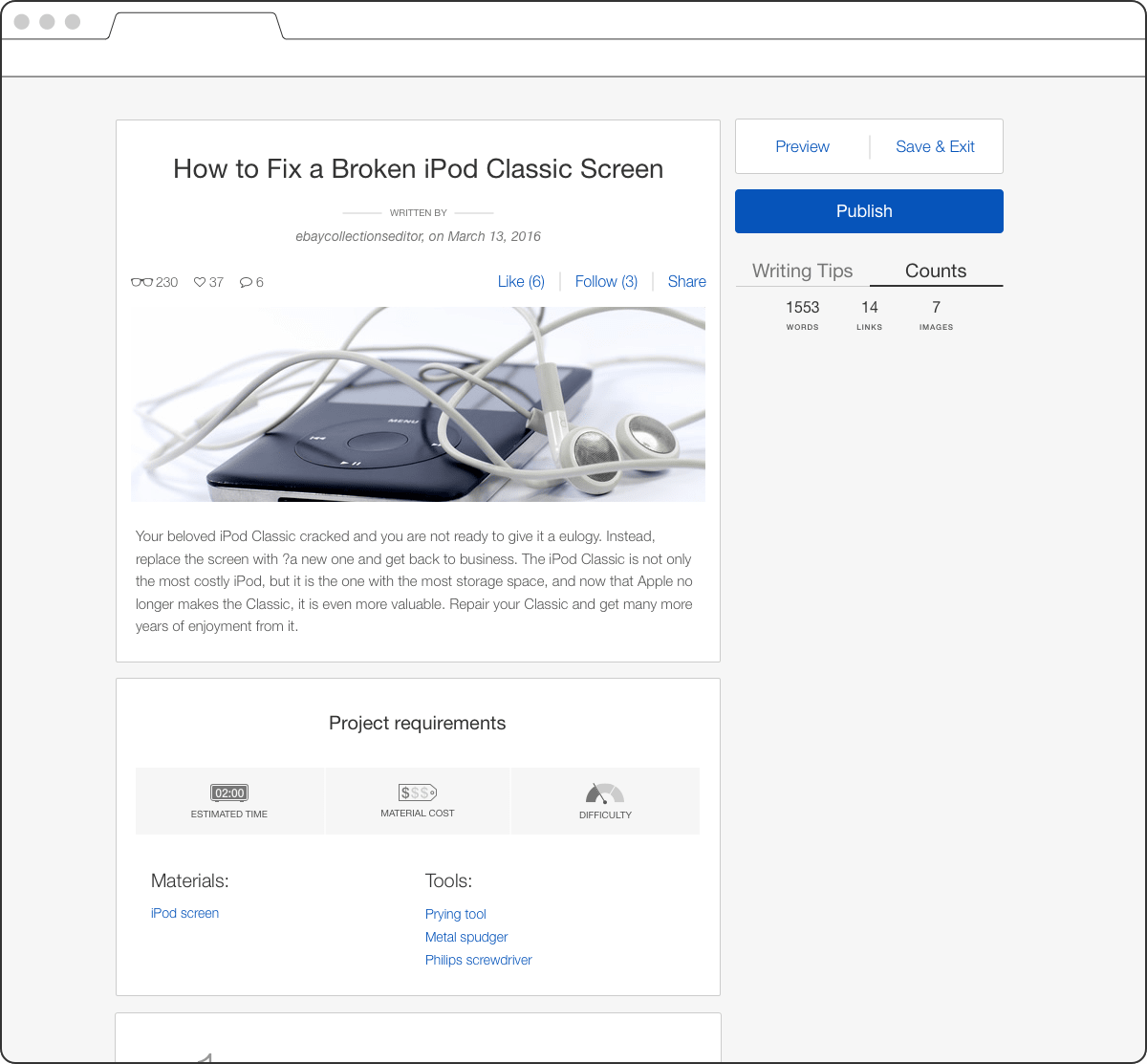
Because Premium Publishers are obligated to write a certain number of words and include a certain number of links and images in each written piece, they required live tracking of these numbers. We added a Counts tab inside the Writing Tips widget and made this tab active by default.
Because Premium Publishers are obligated to write a certain number of words and include a certain number of links and images in each written piece, they required live tracking of these numbers. We added a Counts tab inside the Writing Tips widget and made this tab active by default.
Because Premium Publishers are obligated to write a certain number of words and include a certain number of links and images in each written piece, they required live tracking of these numbers. We added a Counts tab inside the Writing Tips widget and made this tab active by default.
Because Premium Publishers are obligated to write a certain number of words and include a certain number of links and images in each written piece, they required live tracking of these numbers. We added a Counts tab inside the Writing Tips widget and made this tab active by default.
Because Premium Publishers are obligated to write a certain number of words and include a certain number of links and images in each written piece, they required live tracking of these numbers. We added a Counts tab inside the Writing Tips widget and made this tab active by default.
Publishing settings
Publishing settings
Publishing settings
Publishing settings
Publishing settings
The article publishing settings feature consists of four steps: assigning a most fitting category (mandatory), social media image revision (optional), publishing scheduling (optional), and captcha verification and acceptance of legal terms. A basic content creators version of publishing settings consists of only two mandatory steps from the above.
The article publishing settings feature consists of four steps: assigning a most fitting category (mandatory), social media image revision (optional), publishing scheduling (optional), and captcha verification and acceptance of legal terms. A basic content creators version of publishing settings consists of only two mandatory steps from the above.
The article publishing settings feature consists of four steps: assigning a most fitting category (mandatory), social media image revision (optional), publishing scheduling (optional), and captcha verification and acceptance of legal terms. A basic content creators version of publishing settings consists of only two mandatory steps from the above.
The article publishing settings feature consists of four steps: assigning a most fitting category (mandatory), social media image revision (optional), publishing scheduling (optional), and captcha verification and acceptance of legal terms. A basic content creators version of publishing settings consists of only two mandatory steps from the above.
The article publishing settings feature consists of four steps: assigning a most fitting category (mandatory), social media image revision (optional), publishing scheduling (optional), and captcha verification and acceptance of legal terms. A basic content creators version of publishing settings consists of only two mandatory steps from the above.
Outcomes & takeaways
Outcomes & takeaways
Outcomes & takeaways
Outcomes & takeaways
Outcomes & takeaways
After 5 months of design and development, the Articles CMS was launched in the US, UK, Germany and Australia in September, followed by an October's global launch. My team and I received positive and appreciative feedback from the external and internal users. Everyone who used the Guides platform before noted that they did not experience any friction or discomfort from switching platforms, and were very enthusiastic about the experience optimisation and new features. In the next two months, we observed a surge in new articles creation and publishing, which was a solid indicator of success. For the next Articles CMS release we planned to introduce more article templates, test a mix of articles and collections within a continuous browsing experience, introduce a curated continuous browsing experience, and release nearly a million legacy written guides converted into articles.
After 5 months of design and development, the Articles CMS was launched in the US, UK, Germany and Australia in September, followed by an October's global launch. My team and I received positive and appreciative feedback from the external and internal users. Everyone who used the Guides platform before noted that they did not experience any friction or discomfort from switching platforms, and were very enthusiastic about the experience optimisation and new features. In the next two months, we observed a surge in new articles creation and publishing, which was a solid indicator of success. For the next Articles CMS release we planned to introduce more article templates, test a mix of articles and collections within a continuous browsing experience, introduce a curated continuous browsing experience, and release nearly a million legacy written guides converted into articles.
After 5 months of design and development, the Articles CMS was launched in the US, UK, Germany and Australia in September, followed by an October's global launch. My team and I received positive and appreciative feedback from the external and internal users. Everyone who used the Guides platform before noted that they did not experience any friction or discomfort from switching platforms, and were very enthusiastic about the experience optimisation and new features. In the next two months, we observed a surge in new articles creation and publishing, which was a solid indicator of success. For the next Articles CMS release we planned to introduce more article templates, test a mix of articles and collections within a continuous browsing experience, introduce a curated continuous browsing experience, and release nearly a million legacy written guides converted into articles.
After 5 months of design and development, the Articles CMS was launched in the US, UK, Germany and Australia in September, followed by an October's global launch. My team and I received positive and appreciative feedback from the external and internal users. Everyone who used the Guides platform before noted that they did not experience any friction or discomfort from switching platforms, and were very enthusiastic about the experience optimisation and new features. In the next two months, we observed a surge in new articles creation and publishing, which was a solid indicator of success. For the next Articles CMS release we planned to introduce more article templates, test a mix of articles and collections within a continuous browsing experience, introduce a curated continuous browsing experience, and release nearly a million legacy written guides converted into articles.
After 5 months of design and development, the Articles CMS was launched in the US, UK, Germany and Australia in September, followed by an October's global launch. My team and I received positive and appreciative feedback from the external and internal users. Everyone who used the Guides platform before noted that they did not experience any friction or discomfort from switching platforms, and were very enthusiastic about the experience optimisation and new features. In the next two months, we observed a surge in new articles creation and publishing, which was a solid indicator of success. For the next Articles CMS release we planned to introduce more article templates, test a mix of articles and collections within a continuous browsing experience, introduce a curated continuous browsing experience, and release nearly a million legacy written guides converted into articles.
–
–
–
–
–
The Articles project has ended up being my most challenging, complex, fast paced and satisfying project-to-date. Thanks to the talented and success-oriented team, we were able to design and build from the ground up an easy to use, sophisticated and self-contained content publishing CMS with a highly interactive and powerful editor. In early 2017, our business initiative transitioned from a shopping experience to a buying experience and over two dozen shopping engagement related products including Articles and Collections were deprecated and taken offline by the end of that year. In my opinion, Articles CMS would have had a shot if spun off as a standalone product because of its simple but solid ecosystem of rich content base driven publishing and browsing mechanisms.
The Articles project has ended up being my most challenging, complex, fast paced and satisfying project-to-date. Thanks to the talented and success-oriented team, we were able to design and build from the ground up an easy to use, sophisticated and self-contained content publishing CMS with a highly interactive and powerful editor. In early 2017, our business initiative transitioned from a shopping experience to a buying experience and over two dozen shopping engagement related products including Articles and Collections were deprecated and taken offline by the end of that year. In my opinion, Articles CMS would have had a shot if spun off as a standalone product because of its simple but solid ecosystem of rich content base driven publishing and browsing mechanisms.
The Articles project has ended up being my most challenging, complex, fast paced and satisfying project-to-date. Thanks to the talented and success-oriented team, we were able to design and build from the ground up an easy to use, sophisticated and self-contained content publishing CMS with a highly interactive and powerful editor. In early 2017, our business initiative transitioned from a shopping experience to a buying experience and over two dozen shopping engagement related products including Articles and Collections were deprecated and taken offline by the end of that year. In my opinion, Articles CMS would have had a shot if spun off as a standalone product because of its simple but solid ecosystem of rich content base driven publishing and browsing mechanisms.
The Articles project has ended up being my most challenging, complex, fast paced and satisfying project-to-date. Thanks to the talented and success-oriented team, we were able to design and build from the ground up an easy to use, sophisticated and self-contained content publishing CMS with a highly interactive and powerful editor. In early 2017, our business initiative transitioned from a shopping experience to a buying experience and over two dozen shopping engagement related products including Articles and Collections were deprecated and taken offline by the end of that year. In my opinion, Articles CMS would have had a shot if spun off as a standalone product because of its simple but solid ecosystem of rich content base driven publishing and browsing mechanisms.
The Articles project has ended up being my most challenging, complex, fast paced and satisfying project-to-date. Thanks to the talented and success-oriented team, we were able to design and build from the ground up an easy to use, sophisticated and self-contained content publishing CMS with a highly interactive and powerful editor. In early 2017, our business initiative transitioned from a shopping experience to a buying experience and over two dozen shopping engagement related products including Articles and Collections were deprecated and taken offline by the end of that year. In my opinion, Articles CMS would have had a shot if spun off as a standalone product because of its simple but solid ecosystem of rich content base driven publishing and browsing mechanisms.